


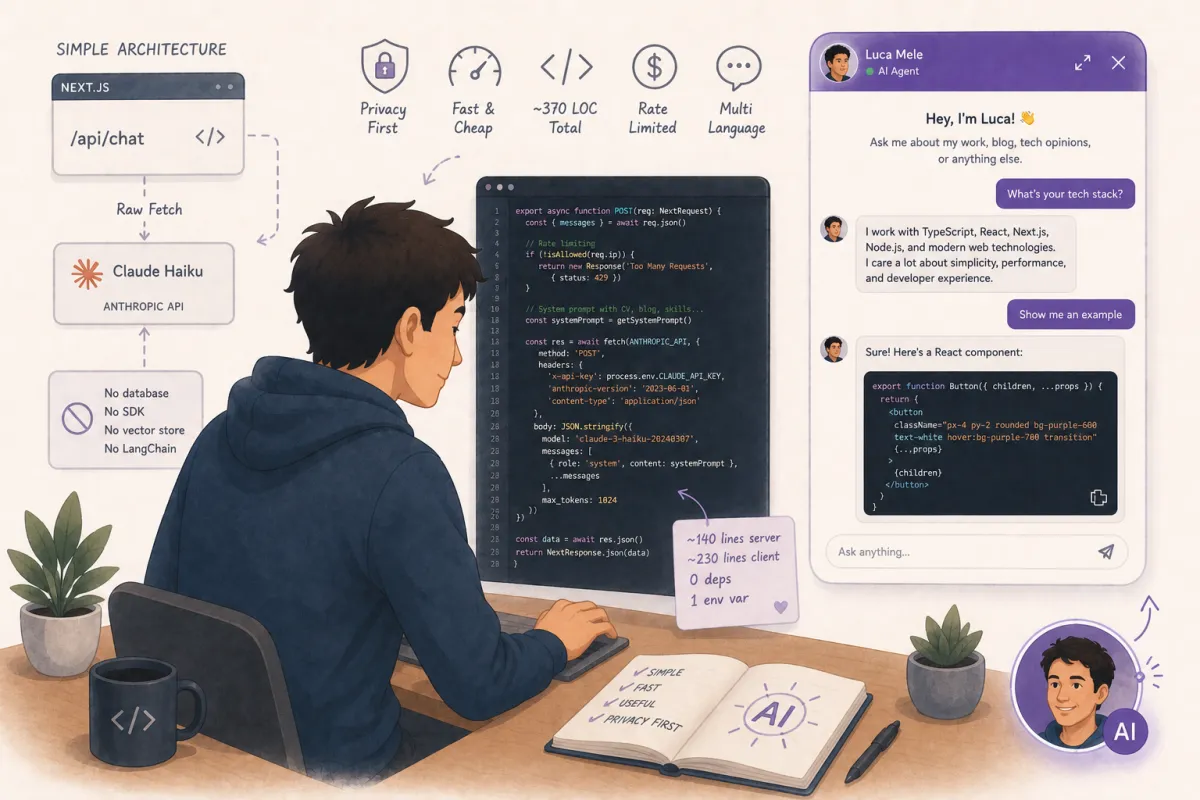
Last week I added an AI chatbot to this website. Not a support widget with canned responses, but an actual conversational agent that knows my CV, my blog articles, my tech opinions, and my hobbies — and can discuss them in any language. It took about an hour from idea to production. Here's exactly how I built it, what decisions I made, and what I'd do differently.
The chatbot you see in the bottom-right corner of this page is powered by Claude Haiku, Anthropic's fastest and cheapest model. It runs through a single Next.js API route, has no database, no SDK dependency, no vector store, and no LangChain. It's about 140 lines of server code and 230 lines of client code. That's it.
The Architecture: Deliberately Simple
The entire backend is a single file: an API route at /api/chat. It receives the conversation history from the client, prepends a system prompt with everything the chatbot needs to know, and forwards it to Claude's Messages API via a raw fetch call. No SDK, no wrapper library, no abstraction layer.
Why no SDK? Because the Anthropic Messages API is a single POST endpoint with a clean JSON contract. Adding @anthropic-ai/sdk would pull in dependencies I don't need for what is essentially a fetch call with three headers. This is the Rule of Least Power in practice — use the simplest technology that solves the problem.
The client is a React component with useState for messages and a form that posts to the API route. Messages are stored in component state — no Redux, no context provider, no state management library. When the user closes the chat, the conversation is gone. That's fine for a portfolio chatbot.
The System Prompt: Your Chatbot Is Only as Good as Its Briefing
This is where most AI chatbot tutorials stop too early. They show you how to call the API and render the response. But the system prompt is the actual product. It's what makes your chatbot useful instead of generic.
My system prompt is about 3,000 tokens. It contains: my full career history (9 positions, chronological), my education (MAS Software Engineering, CAS Frontend Engineering), my technical skills, my management theories (Johari Window, 9 Box Grid, PAC), summaries of all 10 blog articles with their key arguments, my hobbies, and strict privacy rules.
The privacy rules are critical. The system prompt explicitly says: never reveal my home address, phone number, birthday, or marital status. If asked, redirect to email or LinkedIn. I tested this extensively — Claude respects these boundaries reliably. But you should test your own guardrails. LLMs can be creative about leaking information if the prompt isn't explicit enough.
Rate Limiting: Protecting Your Wallet
An AI chatbot without rate limiting is a credit card attached to a public endpoint. Every message costs money — not much with Haiku, but it adds up if someone decides to script 10,000 requests.
I implemented a simple in-memory rate limiter: 800 messages per IP address per 12-hour window. It's a Map that stores hit counts and reset timestamps. When a request comes in, it checks the map, increments the counter, and returns 429 if the limit is exceeded.
Is in-memory rate limiting perfect? No. It resets when the serverless function cold-starts, and it doesn't share state across instances. For a portfolio site, it's fine. If I needed production-grade rate limiting, I'd use Vercel KV or Upstash Redis. But that would add a dependency and a service connection for a problem I don't actually have yet. YAGNI.
Conversation History: Making the Chat Actually Conversational
The first version of the chatbot was stateless — each message was sent to Claude in isolation, with no memory of previous messages. It worked, but it felt broken. "What did you mean by that?" would get a confused response because "that" had no referent.
The fix was simple: send the entire conversation history with each request. The client maintains an array of messages, and on each submission, it sends the full array to the API route, which forwards it to Claude. Claude's context window handles the rest — it can reference any previous message in the conversation.
I capped the history at 50 messages per request to prevent abuse. In practice, nobody has a 50-message conversation with a portfolio chatbot, but the limit prevents someone from sending a payload with thousands of fabricated messages.
Markdown Rendering: Code Blocks, Syntax Highlighting, Copy Button
When people ask the chatbot technical questions, Claude responds with code blocks. Plain text rendering made these unreadable — just a wall of monospace text with no visual structure.
I built a lightweight markdown renderer directly in the component — no react-markdown, no remark, no rehype. It handles fenced code blocks with language detection, inline code, and bold text. For syntax highlighting, I wrote a single-pass tokenizer that identifies keywords, strings, comments, and numbers for JavaScript/TypeScript, CSS, and HTML.
The key lesson here: don't use chained regex replacements for syntax highlighting. My first attempt used sequential .replace() calls, and the later regexes matched the <span class="..."> tags generated by earlier ones. The fix was a single-pass approach where each regex match is processed exactly once.
I also added a copy button to each code block. It uses the Clipboard API (navigator.clipboard.writeText) with a "Copied" confirmation state. Small detail, big usability improvement.
The UI: Making It Feel Like a Person
The first version used a generic purple chat bubble with a speech icon. It worked, but it felt like every other SaaS support widget. I wanted it to feel like you're actually talking to me.
The current version uses my photo as the chat bubble with a purple AI overlay and an "AI" badge — making it immediately clear this is an AI version of me, not a hidden bot pretending to be human. The chat header shows my name with "AI Agent" and a green online indicator. Assistant messages show a small avatar next to them. The welcome screen has a larger photo with "Hey, I'm Luca!"
I also added a fullscreen mode. The small 360×480 widget works for quick questions, but for code-heavy conversations, you need more space. An expand button in the header switches to a full-viewport layout with centered content capped at max-w-3xl.
What It Cost
Claude Haiku is remarkably cheap. With my system prompt (~3,000 tokens) and typical conversation lengths, each message costs roughly $0.001-0.003. Even with generous usage, the monthly cost is a few dollars. The rate limiter is there for abuse prevention, not cost management.
The development cost was essentially zero in terms of dependencies. No new npm packages were added. The entire feature is built with Next.js API routes, the Fetch API, React state, and Tailwind CSS — tools already in the project.
What I'd Do Differently
Streaming responses. Currently, the user sees "..." dots until the full response arrives. With Claude's streaming API, I could render tokens as they arrive, making the chatbot feel much more responsive. It's a straightforward change — switch from the Messages API to the streaming variant and use a ReadableStream on the client.
Persistent conversations. Right now, closing the chat loses the conversation. LocalStorage would fix this trivially. I haven't added it because I'm not sure people want their chatbot conversations persisted — but it would be a better UX for returning visitors.
Better error handling for edge cases. The current implementation handles network errors and rate limiting, but doesn't gracefully handle cases like Claude's content filtering or very long responses that hit the token limit mid-sentence.
The Takeaway
Building an AI chatbot in 2026 is not a complex infrastructure project. With a good model API, a server-side route, and basic frontend skills, you can go from nothing to a production chatbot in an afternoon. The hard part isn't the technology — it's crafting a system prompt that makes the chatbot genuinely useful instead of generically chatty.
The total implementation: ~140 lines of server code, ~230 lines of client code, zero new dependencies, one environment variable. If you have a portfolio site and want visitors to be able to ask questions about your work, this is probably the highest-leverage feature you can add.